
Download SmarterStats – website traffic analysis, statistical reporting, data collection, log-based storage, website optimization
Overview
SmarterStats is a web-based analytics tool developed by Smarter Tools, designed to deliver comprehensive statistical reporting for website traffic analysis. The application focuses on helping website owners and digital marketers understand visitor behavior, track performance metrics, and optimize their online presence. By collecting and organizing data through a log-based storage system, SmarterStats enables users to access historical traffic information without relying on complex database infrastructure. This approach simplifies data management and reduces technical overhead, making it suitable for small to medium-sized websites that require reliable analytics without advanced technical setup.
The tool is particularly valuable for webmasters seeking insights into user behavior, including page views, session duration, traffic sources, and device or browser usage. These insights support data-driven decisions in content strategy, site design, and marketing efforts. While the developer did not provide additional technical details about scalability or integration capabilities, the application’s core purpose remains clear: to offer an efficient, accessible solution for monitoring and interpreting website performance. Its release in 2013 indicates a long-standing presence in the analytics space, suggesting stability and consistent updates over time.
SmarterStats serves as a utility within the broader productivity category, targeting individuals and organizations that prioritize website optimization through accurate data collection. The application is especially useful for teams managing multiple sites or those operating on limited technical resources. Although specific user demographics were not disclosed, its design implies a focus on usability and clarity, essential for non-technical users who still need actionable insights. In the current app ecosystem, where many analytics platforms are cloud-heavy or subscription-based, SmarterStats stands out with its free, self-hosted model and log-based architecture.
Key Features & Functionality
- Comprehensive Traffic Analysis: SmarterStats enables detailed tracking of website visits, including total volume, peak activity times, and geographic distribution of users. This feature allows site owners to identify high-traffic periods and tailor content delivery accordingly.
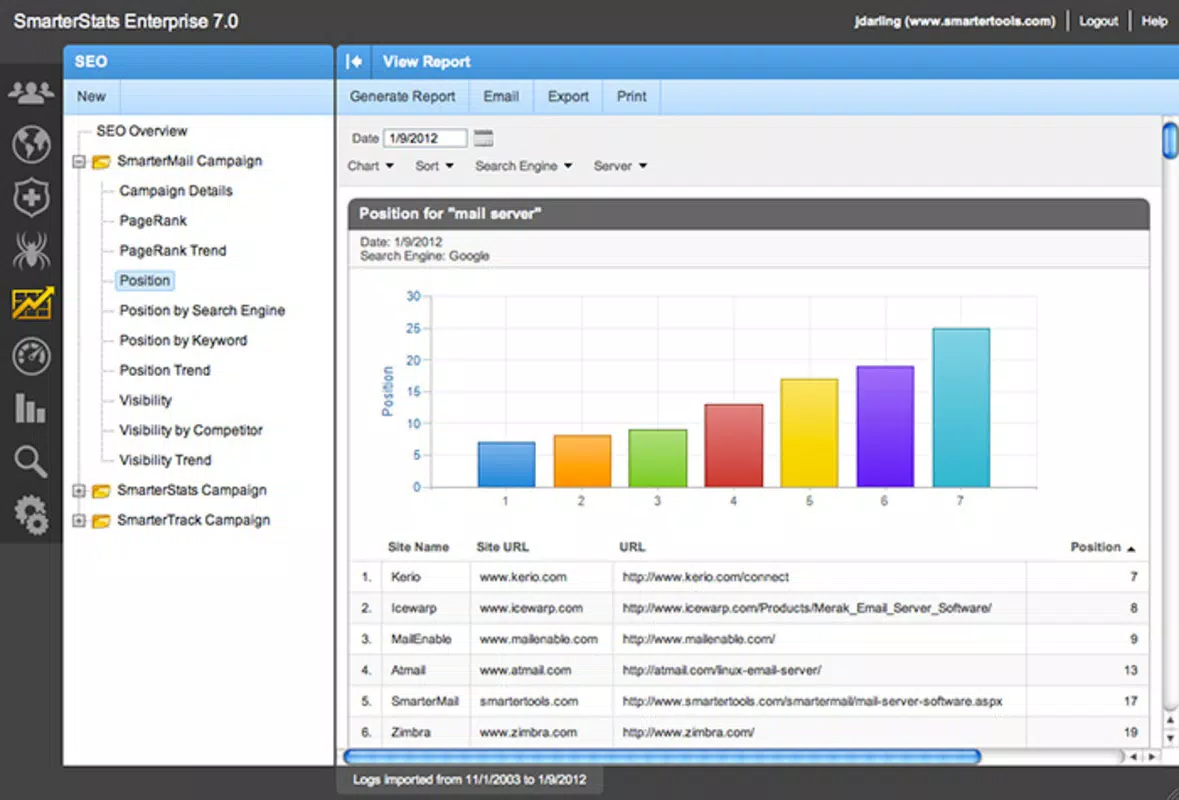
- Smart, Organized Reports: The software generates structured reports that present data in a clear, visual format. Users can customize reports to highlight specific metrics such as bounce rate, referral sources, or conversion trends, improving the efficiency of decision-making.
- Log-Based Data Storage: Instead of using databases, SmarterStats stores traffic data in log files. This method reduces server load and simplifies data retrieval, enabling users to review historical information at any time without complex queries.
- User Behavior Insights: The application monitors how visitors interact with the site, including pages viewed, time spent per session, and navigation paths. These insights help identify popular content and areas needing improvement.
- Browser and Device Tracking: SmarterStats records the types of browsers and devices used by visitors. This data assists in optimizing site compatibility and performance across platforms, ensuring a consistent user experience.
For example, a content publisher could use the user behavior insights to determine which articles generate the most engagement and adjust their editorial calendar. Similarly, an e-commerce site might leverage browser and device data to ensure mobile responsiveness is prioritized. The log-based storage system allows developers to audit traffic patterns over months or years without relying on external services, enhancing long-term data retention and compliance.
Interface, UX & Performance
As a web-based application, SmarterStats presents its interface through a standard browser, eliminating the need for native app installation. The user interface appears to emphasize clarity and functionality, with data displayed in charts, tables, and summary panels. Navigation is likely structured around core analytics categories such as traffic sources, user behavior, and technical performance, allowing users to switch between views with minimal friction.
Although the developer did not list formal performance metrics, the application’s reliance on log-based storage suggests a lightweight architecture that may perform efficiently on modest server resources. This design choice could contribute to faster load times and lower latency, particularly when accessing historical data. The interface appears optimized for desktop use, with responsive layouts that adapt to different screen sizes, though specific mobile compatibility details were not provided.
Responsiveness and stability are expected to be consistent, given the application’s long-standing release history. However, users should ensure their hosting environment meets the necessary requirements for running the software. The absence of reported crashes or bugs in public forums may indicate a stable runtime, but no formal performance benchmarks were shared. Overall, the UX prioritizes accessibility and data clarity, aligning with the needs of users who value straightforward, actionable insights.
Platform Compatibility & Technical Requirements
SmarterStats is a web-based application, meaning it operates through a browser and does not require a native mobile or desktop installation. It is accessible from any device with internet connectivity and a modern web browser. The platform supports both desktop and mobile web access, though the developer did not specify exact compatibility details for mobile browsers or tablet environments.
The software version is 2.0.1, with a file size of 150 MB, indicating it is a self-hosted solution that must be deployed on a server. The developer did not specify minimum operating system requirements, browser versions, or hardware specifications. As such, users are advised to consult the official documentation or support resources for guidance on system compatibility. The lack of detailed technical requirements suggests the application may be designed to run on standard web servers, but this remains unconfirmed.
Pros and Cons
- Free to use with no subscription fees
- Log-based data storage reduces server load and complexity
- Self-hosted model enhances data privacy and control
- Comprehensive reporting with customizable views
- Long-standing presence with consistent updates since 2013
- Requires server setup and maintenance
- No native mobile app available
- Technical knowledge may be needed for deployment
- Developer did not provide detailed performance benchmarks
- Compatibility with specific browsers or devices was not disclosed
FAQ
Is SmarterStats available as a mobile app?
SmarterStats is a web-based tool and does not have a dedicated mobile application. It can be accessed via a mobile browser, though the experience may vary depending on the device and screen size.
Can I use SmarterStats for multiple websites?
Yes, SmarterStats is designed to handle multiple websites. Users can configure and monitor several domains from a single dashboard, making it suitable for agencies or site owners managing multiple online properties.
Is the data stored securely?
As a self-hosted solution, data is stored on the user’s own server, which provides greater control over security and compliance. However, the developer did not provide specific details about encryption or access controls.
How often is the software updated?
SmarterStats has been updated since its initial release in 2013. While the frequency of updates is not publicly disclosed, the continued availability suggests ongoing maintenance and support.
Do I need technical skills to install SmarterStats?
Basic technical knowledge is recommended for installation and configuration, as the software requires server setup. Users should be comfortable with file management, web server configuration, and basic networking.
Final Thoughts
SmarterStats offers a reliable, cost-effective solution for website traffic analysis, particularly for users who value data ownership and simplicity. Its log-based storage system sets it apart from traditional analytics platforms, providing a lightweight alternative that avoids database overhead. While it lacks a native mobile presence and requires server deployment, its free model and long-term stability make it a compelling choice for developers, small businesses, and digital marketers seeking transparent, customizable insights.
For those managing websites and aiming to improve performance through data, SmarterStats delivers practical tools without the complexity of cloud-based subscriptions. The ability to access historical data and generate tailored reports enhances strategic planning and optimization efforts. If you're looking for a secure, self-hosted analytics utility that supports website optimization, this tool is worth exploring.
Download SmarterStats now


